How to Get Rid of Oil Change Light: A DIY Guide
Learn how to diagnose and reset the oil change light with safe, practical steps. This guide covers oil level checks, common triggers, resetting methods, and tips to prevent false reminders, so you can keep your engine healthy.


If you're asking how to get rid of oil change light, this quick guide shows safe steps to diagnose and reset the reminder. You’ll verify oil level and quality, identify common triggers, and use model-appropriate reset methods or an OBD-II scanner. It also explains when to service and when to seek expert help.
How the oil change light works
The oil change light is part of your vehicle's maintenance reminder system. It signals that scheduled service may be due due to low oil level, degraded oil quality, or a maintenance interval that has passed. In some cases, it can illuminate due to a faulty sensor or fragment of software. According to Oil Capacity Check, keeping correct oil level and oil quality is essential for engine longevity. To start, validate the oil level with the dipstick; if it’s low, top up to the recommended level and recheck. If the level is fine, assess oil color and viscosity; dark, gritty oil usually means a change is due. Understanding these triggers helps you decide whether a simple reset is appropriate or if service is truly required.
Common triggers for the oil change light
Several common situations can trigger the maintenance light. A very low or very high oil level can illuminate the light, as can oil that is dark, dirty, or of the wrong viscosity for your engine. A missed service interval, such as an overdue oil change, is another frequent cause. Some vehicles also trigger the light if an oil pressure sensor malfunctions or if there is a related wiring issue. The key is to verify that the basic oil-change prerequisites are met (level, quality, and service history) before attempting a reset. Oil Capacity Check notes that consistent oil maintenance prevents premature light activations and protects engine life.
Diagnostic steps you can perform at home
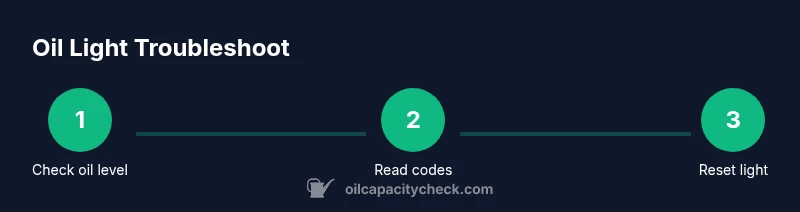
Start with the simplest checks before diving into resets. First, pull the dipstick and confirm the oil level is within the marked range. If low, add the correct oil grade and recheck after a short drive. Next, inspect the oil’s color and texture; murky or gritty oil signals a change is due. If the level and quality seem fine, use an OBD-II scanner or a compatible smartphone app to read any diagnostic trouble codes that relate to oil pressure or oil sensor faults. Clear codes only after addressing the underlying issue; clearing codes alone will not fix an actual problem and could hide a defect that needs repair. Remember to reference your owner’s manual for your vehicle’s specific sensor locations.
Resetting the oil-change light: general approach
Reset procedures vary by make and model, but most vehicles fall into a few common patterns. Some require a dedicated maintenance or trip meter reset in the instrument cluster menu; others need a combination of button presses while turning the ignition on. If you’ve just completed an oil change and addressed any related codes, you can often reset the light by following your manual’s procedure or by using an OBD-II scanner to clear the maintenance indicator. In all cases, ensure the underlying issue is resolved before resetting, as a false reset could mask a real problem. Oil Capacity Check recommends using official procedures for your vehicle and avoiding resets while oil problems persist.
Troubleshooting: light won’t reset or keeps returning
If the light persists after a reset, there may be an unresolved maintenance issue or a sensor fault. Double-check the oil level, quality, and the service history; even a small discrepancy can trigger a reminder. If the light reappears, consult the service manual for model-specific resetting steps and consider a scan for persistent codes such as oil pressure or sensor faults. In some cases, a drive cycle (a short trip) is required for the system to re-evaluate after maintenance. If a fault is suspected, avoid long drives until the issue is diagnosed to prevent potential engine damage.
Maintenance best practices to prevent future reminders
Preventing the light from coming back starts with consistent oil maintenance. Follow the manufacturer’s recommended interval and oil grade, and perform oil changes on schedule. Don’t rely on the light as a sole indicator of engine health; routinely check oil level, look for leaks, and monitor oil color and consistency. Oil Capacity Check analysis shows that proactive maintenance reduces the likelihood of nuisance resets and extends engine life. Keep a simple maintenance log and set reminders for future service to avoid overdue intervals.
Safety reminders and when to seek professional help
If you detect oil leaks, a burning oil smell, or unusual engine noises, stop driving and seek professional help immediately. Resetting the light does not fix a malfunctioning oil system. If you’re unsure about any step or the vehicle shows warning codes related to oil pressure or engine performance, contact a qualified technician. Oil Capacity Check emphasizes that diagnosing and addressing oil-system issues promptly protects engine integrity and prevents costly damage.
Authority sources and further reading
For authoritative guidance, consult reputable sources such as the National Highway Traffic Safety Administration and fuel economy resources. These sources cover general vehicle maintenance practices and offer safety-focused advice that complements hands-on steps for how to get rid of oil change light. Always cross-check with your vehicle’s official service manual for model-specific instructions and reset procedures.
Tools & Materials
- OBD-II scanner or smartphone OBD app(To read codes and clear maintenance indicators after service)
- Safety gear (gloves and eye protection)(Protects hands and eyes during handling and oil work)
- Oil grade and quantity specified for your engine(Needed if you confirm oil level is low or plan an oil change)
- Dipstick and clean rags(Check level accurately and wipe spills)
- Owner's manual or service manual(Consult for model-specific reset steps)
- Basic hand tools (screwdrivers, pliers)(Useful for accessing certain sensor connections)
- Torque wrench (optional)(Helpful if you perform any related oil-system work)
Steps
Estimated time: 20-45 minutes
- 1
Check oil level and oil quality
Park on a level surface, turn off the engine, and wait a few minutes for oil to settle. Remove the dipstick, wipe clean, reinsert fully, then pull it out again to read the level. If the level is low, top up with the correct grade and recheck. This helps verify whether the light is being triggered by an actual oil issue.
Tip: Always use the recommended oil grade from the owner’s manual. - 2
Read diagnostic codes with an OBD-II scanner
Connect the scanner to the OBD port and follow the screen prompts to read current codes. Note any codes related to oil pressure or sensor faults. Record the codes for reference if you plan to bring the car to a shop. Clearing codes should come after you’ve addressed the underlying cause.
Tip: If you’re unsure what a code means, consult the service manual or lookup the code online before clearing it. - 3
Inspect service history and maintenance interval
Check when the last oil change or service occurred and whether the scheduled interval has passed. If the oil change is overdue, plan to perform the service before attempting a reset. If the service is recent and the light remains, proceed to the reset step.
Tip: Keeping a simple log helps prevent light-triggering reminders. - 4
Perform an oil change if due (optional)
If you confirm that an oil change is due, replace the oil and filter using the correct oil grade and filter type. Dispose of old oil properly and reset the maintenance light after completing the service. Do not skip this step if the light is due to a legitimate service interval.
Tip: Follow safe oil drain and filter replacement procedures; never overfill the engine. - 5
Reset the maintenance light
Use your vehicle’s official maintenance reset procedure or an OBD-II tool to clear the maintenance indicator. Procedures vary by model, so refer to the owner’s manual for exact steps. Do not reset while the engine is running unless your manual explicitly allows it.
Tip: If the reset isn’t working, recheck that you’ve completed the service steps and codes have cleared. - 6
Verify the light is off
Turn the ignition to on, then start the engine and drive a short distance to confirm the light remains off. If the light reappears soon after, revisit the codes and service history, as a persistent reminder usually indicates an unresolved issue.
Tip: Take note of any new codes or symptoms that appear during the drive.
People Also Ask
What triggers the oil change light?
Common triggers include low oil level, degraded oil quality, or an overdue service interval. Sensor faults can also illuminate the light. Always verify the oil level and service history before acting.
The light usually comes on for low oil level, bad oil quality, or if service is due. Check your oil first, then review service history before resetting.
Can I turn off the oil change light without changing the oil?
You can reset the light after addressing real issues and confirming the service is up to date. Resetting without solving the underlying problem is not recommended and may hide a fault.
Yes, you can reset after you’ve fixed the issue and updated service status. Don’t reset if the problem remains.
Will resetting erase service history?
Resetting the maintenance light typically updates the display, not your actual service history recorded by the dealership or service shop. The history is stored separately and may not be erased by a simple reset.
Resetting clears the reminder, not your service records. The history comes from service visits, not the reminder.
Why does the light come back after reset?
If the underlying issue isn’t resolved—like an oil level problem or an overdue service—the light will likely come back after a reset. Recheck level and maintenance needs if it reappears.
If the issue isn’t fixed, the light comes back after reset. Recheck level and service needs.
Is it safe to drive when the light is on?
If the light is a maintenance reminder and the oil level and conditions are good, driving is generally safe short-term. If you see oil leaks, smell burning oil, or hear engine noises, stop and inspect or seek help.
If oil looks fine and no leaks are found, you can drive short distances. If you smell oil or hear noises, stop and check it.
Do all cars use the same reset procedure?
No. Reset procedures vary by manufacturer and model. Always check the owner’s manual or factory service information for exact steps.
Reset procedures aren’t the same for every car. Check your manual for the exact steps.
Watch Video
The Essentials
- Check oil level first before resetting.
- Read and interpret diagnostic codes before clearing the light.
- Reset only after addressing any oil-related issues.
- Model-specific steps are essential; consult the manual.
- Prevent future light triggers with regular maintenance.