How to Fix the Oil Change Light: DIY Guide
Learn how to diagnose and fix the oil change light on most cars. Check oil level, oil quality, sensor status, and reset the maintenance light with a safe, step-by-step approach from Oil Capacity Check.


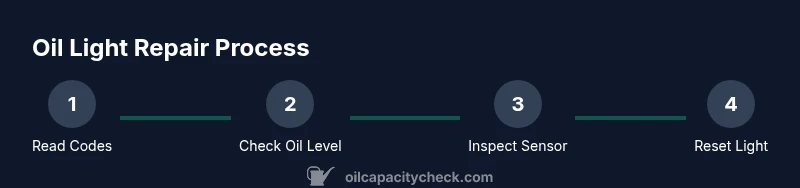
You will diagnose and fix the oil change light by checking the oil level, assessing oil quality, testing the sensor, and resetting the maintenance light after completing the service. Start with a safe parked position, gather basic tools, and confirm you have the correct oil specification for your engine. This guide, based on Oil Capacity Check Analysis, 2026, walks you through each step.
how to fix oil change light: What triggers it
Oil change lights are part of modern maintenance reminders. According to Oil Capacity Check, they usually turn on when the vehicle's internal monitor detects conditions that suggest the engine oil is degraded, at a low level, or when the maintenance schedule has elapsed. Common triggers include: a low oil level detected by the dipstick or sensor, degraded oil quality, a faulty oil pressure sensor, or a software recalibration issue after an oil change. Understanding the cause helps you decide whether you can safely drive to a service bay or if immediate action is needed. In most cases, a quick dipstick check and basic diagnostics will reveal the culprit. If you notice a bright red oil pressure warning, strange engine noises, or the engine is overheating, treat it as urgent and stop driving.
Preparation and safety every DIYer should know
Before you touch anything, ensure you are in a safe environment. Park on a level surface, apply the parking brake, and place wheel chocks if needed. Turn off the engine and wait for it to cool. Have a clean workspace, good lighting, and a spill tray ready. This guide from Oil Capacity Check emphasizes safety as the first step to avoid burns, slips, or accidental fuel contact. Keep a fire extinguisher nearby when working under a vehicle and wear gloves to protect your hands from hot metal and oil.
Diagnostic overview: deciding between level, sensor, or service issues
Many oil light problems come down to three root causes: low or degraded oil, a faulty oil pressure sensor or wiring, and maintenance interval reminders triggered by software. An OBD-II diagnostic tool can reveal codes tied to oil pressure or level warnings. If Codes point to sensor or wiring, you may be able to repair without a full oil change. If the oil is dark, sludgy, or smells burnt, an oil change is likely needed. Oil Capacity Check analyses in 2026 show that most maintenance-light resets resolve after addressing oil level or sensor faults rather than a full engine overhaul.
Step 1: check the oil level with the dipstick
Locate the dipstick, pull it out, wipe clean, reinsert fully, and pull again to read the level. If the oil is below the minimum mark, add the recommended oil until it reaches the proper range. Use a funnel to avoid spills and recheck after a few minutes of settling. If the level is correct but the light persists, the issue is likely sensor-related or a software reminder requiring reset. This step is foundational and should be done with care to avoid overfilling.
Step 2: assess oil quality and age
Oil should have a clean, amber color and a pleasant, faintly chemical scent. If it appears very dark, gritty, or has a burnt odor, it may be overdue for an oil change. If you recently added oil, mix and settle the new oil with the old to avoid creating imbalances. A degraded oil condition can trigger the light even if the level is fine, so use this check to decide whether a full change is due.
Step 3: inspect the oil pressure sensor and wiring
Visually inspect the sensor and its wiring for signs of corrosion, loose connectors, or damaged insulation. A poor connection can cause intermittent warning lights. If you have access to a multimeter, you can perform a simple resistance check per the vehicle manual. Replacing a faulty sensor can resolve false positives without a full oil change. If you notice oil leaks around the sensor, address the leak before continuing.
Step 4: consider the option of a full oil change
If the oil is old or contaminated, or if you recently changed the oil and the light remains, a full oil change (oil + filter) is often the most reliable fix. Use the manufacturer's recommended viscosity and oil type. After completing an oil change, it’s common for the maintenance light to require a reset. Record any codes or observations from the service so you can verify after the reset that the issue is resolved.
Step 5: resetting the maintenance light after service
Many vehicles require a specific sequence to reset the oil maintenance light. This typically involves turning the ignition, navigating through the vehicle's information display or the service menu, and selecting the reset option. If your car uses a physical trip-reset procedure, consult your owner’s manual for exact steps. After a reset, start the engine and let it run for a minute to confirm that the light stays off. If it returns, revisit steps 1–4.
Step 6: if the light stays on, when to seek professional help
If the warning persists after level checks, sensor tests, and a possible oil change, the issue may be deeper, such as a failing oil pump, clogged oil passages, or a more complex sensor system fault. In this case, avoid long drives and schedule a visit to a trusted mechanic. Early professional diagnostics can prevent expensive engine damage.
Step 7: key maintenance practices to prevent future triggers
Keep oil changes on schedule, use the correct oil grade, and monitor oil level regularly. Use a high-quality oil filter and replace it with each service. A well-maintained vehicle reduces the likelihood of false or persistent maintenance lights and preserves engine longevity. Regular checks can catch issues before they trigger a warning light.
Step 8: additional checks for diesel engines or specialty vehicles
Diesel engines and some performance cars have more complex oil monitoring systems. If your vehicle falls into these categories, follow the manufacturer’s maintenance schedule precisely and rely on manufacturer-grade oils and filters. Some systems also require specific reset procedures after service. When in doubt, consult the service manual or a certified technician.
Tools & Materials
- oil dipstick(Used to verify current oil level on a level surface)
- clean rag(For wiping dipstick and catching drips)
- engine oil (correct viscosity)(Use the grade specified in the owner manual)
- oil filter(If performing an oil change, replace the filter)
- oil filter wrench(Optional but helps remove old filter)
- funnel(Pour oil without spills)
- catch pan(Contains used oil during drain)
- socket wrench set(Remove drain plug and sensor connections if needed)
- gloves(Protect hands from hot oil and sharp edges)
- OBD-II scanner(Helpful for reading oil-related trouble codes)
- owner's manual(Verify model-specific procedures and specs)
Steps
Estimated time: 60-120 minutes
- 1
Read fault codes with OBD-II scanner
Connect the scanner to the vehicle’s OBD-II port and retrieve any fault codes related to oil pressure, level, or sensor faults. Record codes for cross-check with what you observe under the hood.
Tip: Codes guide you toward whether the issue is sensor-related or oil-related. - 2
Park safely and prepare the workspace
Finish the safety checks, set parking brake, and chock the wheels. Ensure the engine is cool before touching any parts.
Tip: A cool engine reduces the risk of burns and makes it easier to handle components. - 3
Check the oil level with the dipstick
Remove the dipstick, wipe, reinsert, and read the level. If low, add the recommended oil slowly until the level sits between the marks.
Tip: Overfilling can cause foaming and pressure; add a little at a time and recheck. - 4
Assess oil quality and age
Look for color, clarity, and smell. Burnt odor or very dark oil indicates overdue replacement or contamination.
Tip: Even if the level is fine, degraded oil can trigger the light. - 5
Inspect the oil pressure sensor and wiring
Check connectors for corrosion or looseness and inspect the sensor body for damage. Ensure wires are intact.
Tip: A poor connection can mimic a sensor fault and trigger false warnings. - 6
Decide on an oil change if needed
If the oil is old or contaminated, perform an oil change along with a fresh filter using the correct grade.
Tip: Change the filter at the same time to maximize cleanliness and protection. - 7
Reset the maintenance light after service
Follow your vehicle’s reset procedure in the manual or service menu to clear the light after a successful service.
Tip: Reset only after you’ve completed the maintenance steps to avoid false resets. - 8
Run a quick post-reset test
Start the engine and let it run for a minute; confirm the light remains off and monitor for any recurrent warnings.
Tip: If the light returns, re-check steps 1–7 or seek a professional assessment. - 9
Plan preventive maintenance
Set reminders for future oil changes and regular oil level checks to minimize false warnings.
Tip: Prevention reduces risk of engine wear and lowers repair costs over time.
People Also Ask
What causes the oil change light to come on?
The light usually signals low oil level, degraded oil, a faulty sensor, or a maintenance reminder. Verify with a dipstick check and, if available, scan codes.
The oil change light usually means low oil level, bad oil, or a sensor issue. Check the dipstick and scan for codes.
Can I drive my car if the oil light comes on but I’m not sure why?
If the light is on continuously and you hear unusual noises or see overheating, stop driving and diagnose. If the level is in range and no warning persists after a service, light may reset.
If the light stays on and you hear knocking or see heat, stop and check it. If it’s just a sensor or reset issue, you may need service to be sure.
How do I reset the maintenance light after an oil change?
Reset procedures vary by model. Typically you’ll access the service menu and select maintenance reset, or perform a key-ignition sequence per the manual.
Most cars have a reset option in the service menu or a specific ignition sequence; check your manual.
What if the light comes back after a reset?
Re-check the oil level and quality, test the sensor, and confirm there are no leaks. If unresolved, seek professional help.
If it comes back, double-check the oil and sensor, or get a professional check.
Is it safe to ignore the oil change light if I just topped up the oil?
No. Topping up oil without addressing potential sensor faults or oil age can mask a real issue and risk engine damage.
No, topping up isn’t a cure. The light could signal a real problem that needs diagnosis.
Should I replace the oil filter every time I change oil?
Yes. Replacing the filter with every oil change helps remove contaminants and protects engine components.
Yes, replace the filter with every oil change for best protection.
Watch Video
The Essentials
- Check oil level first before assuming a faulty light
- Oil quality and age can trigger the light without a low level
- Sensor and wiring faults are common non-oil causes
- Reset the light only after completing the service
- Consult the owner manual or Oil Capacity Check for vehicle-specific steps