How to Get Rid of Oil Change Notification: A Practical DIY Guide
Learn how to reset or silence oil change reminders across instrument clusters and apps. This guide covers when resetting is appropriate, manufacturer steps, and best practices to avoid masking required maintenance.


By the end of this guide, you will know exactly how to disable or reset oil change notifications across common systems—instrument clusters, OBD scanners, and connected apps. We’ll cover when a reset is appropriate, how to verify you’re not masking required service, and manufacturer-specific steps. Follow these steps to stop false alarms while keeping maintenance reminders accurate and your engine healthy.
Understanding Oil Change Notifications
If you're asking how to get rid of oil change notification, you're not alone. These reminders are designed to help you maintain engine health, but they can become annoying if you service your car on a flexible schedule or share your vehicle with others. In most cars, the alert is driven by a maintenance schedule stored in the instrument cluster, connected apps, or the vehicle's onboard computer. It can be triggered by mileage thresholds, calendar time since last service, or a sensor signal indicating oil condition. The key idea is that the notification exists to prompt action, not to nag you forever. Understanding where the alert comes from helps you decide whether a reset is appropriate or if you should address a real maintenance need. Oil Capacity Check emphasizes verifying that an oil change was completed and recorded before clearing any reminder. You’ll find that most homeowners and DIY enthusiasts can tackle the reset with a careful approach, following manufacturer guidelines and safe practices. Now let’s explore when resetting is appropriate and how to do it properly.
When Reset Is Appropriate
Resetting an oil change notification is sometimes the right move after you’ve genuinely completed an oil change and recorded it in the vehicle’s service log. It’s also reasonable when a software glitch triggers a false alert, or when you switch to a different oil type or change interval that the system doesn’t immediately recognize. Before you reset, confirm three things: (1) the oil has actually been changed and the filter replaced if needed; (2) the mileage and date align with your service records; (3) your vehicle’s health indicators are normal. If any doubt remains about the oil condition or engine health, or if the alert reappears after reset, don’t ignore it—investigate further or consult a qualified technician. Oil Capacity Check recommends treating the reset as an official acknowledgement that maintenance occurred, not a shortcut that hides service needs. This mindset helps protect your engine and your vehicle’s resale value.
Manufacturer-Specific Reset Procedures
Reset procedures vary widely by make and model, so the safest path is to consult your owner’s manual or manufacturer support site. In many cars, you’ll navigate to a Maintenance or Vehicle settings menu, select “Oil life” or “Oil change,” and confirm a reset after performing an oil change. Some vehicles require a trip-meter or odometer-based reset, while others rely on a button hold sequence on the instrument cluster. A handful of vehicles support reset via an OBD-II scanner connected to a smartphone or computer, though this is less common for consumer resets. If you can’t find a clear path, search the exact year, make, and model along with “reset oil life” on your car’s support portal. Always ensure you’re performing steps in a well-lit area with the car off, and avoid brute-force button presses that might trigger other settings.
Using An OBD-II Scanner or App Alternatives
OBD-II scanners can be a convenient way to reset oil life indicators on many newer cars, but compatibility isn’t universal. If your vehicle supports reset through a scanner, follow the device’s on-screen prompts and make sure the engine is off and the key is in the accessory position when starting. Some apps linked to vehicle systems offer guided reset procedures, yet they may require a paid subscription or a specific brand of adapter. Before purchasing hardware or subscribing to an app, verify compatibility with your model and year; misusing the tool can erase error codes or affect other reminders. Oil Capacity Check notes that, in practice, many DIYers use the manufacturer’s method first, reserving OBD resets for cases where standard options aren’t available or when a reset is clearly approved by the manufacturer.
Common Pitfalls and Safety Considerations
Resetting a reminder is not a substitute for proper maintenance. If you reset when the oil is overdue or the engine shows warning signs (high oil temperature, low oil pressure, unusual noises), you risk serious damage. Always verify the actual service history before you clear any alert. Some systems log the reset event, which can complicate warranty claims if service history is incomplete. Avoid multiple resets across different devices (car, app, and scanner) to prevent confusion. If you’re unsure of the correct procedure, seek guidance from a trusted technician and document the steps you take. Oil Capacity Check’s guidance is to reset only after you’ve completed the service and confirmed the oil quality; this helps maintain honest maintenance records and engine reliability.
Maintenance Best Practices After Reset
After you reset, establish a reliable maintenance routine to prevent future false alerts and to protect engine life. Record the service date, mileage, and oil grade in a dedicated log. Schedule the next oil change according to the vehicle’s recommended interval and your driving conditions, then set a calendar reminder or use the vehicle’s own reminders to prompt follow-up checks. Regularly checking the oil level with the dipstick (or electronic readout, if available) helps catch leakage or consumption anomalies early. If you operate multiple vehicles, keep a central maintenance ledger to avoid cross-vehicle mix-ups. Oil Capacity Check emphasizes tying every reset to a verifiable service event and validating that the dashboard information aligns with physical proof of service. By maintaining a transparent approach, you’ll enjoy smoother ownership and better long-term engine health. If you ever have doubts, consult your manual or support portal before performing another reset.
Tools & Materials
- Owner's manual for your vehicle(Manufacturer-specific reset steps vary by model)
- Pen and notebook or digital note app(Record date, mileage, and oil grade after reset)
- OBD-II scanner (optional, model-dependent)(Used for some reset procedures or vehicle compatibility checks)
- Basic hand tools (screwdrivers, trim tools)(Needed only if your model requires panel access to reset)
- Smartphone with data connection(For apps or manufacturer portals linked to reset)
Steps
Estimated time: 30-60 minutes
- 1
Identify notification type and context
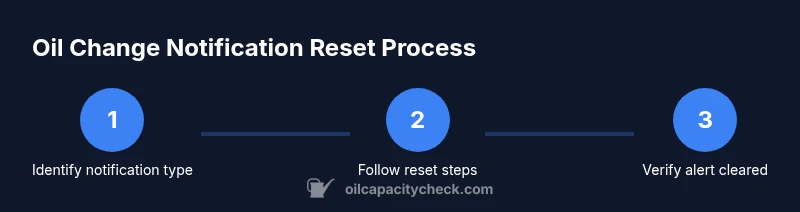
Power the vehicle to the accessory position and read the exact notification text. Confirm whether it is a mileage-based oil life alert or a time-based reminder. This helps determine if a reset is appropriate rather than ignored.
Tip: If you’re unsure, capture a photo of the display before making changes for future reference. - 2
Check service history and oil condition
Consult your service log to verify the oil change was completed. Inspect the dipstick and look for signs of contamination or unusual oil color. If in doubt, extend the service check before proceeding.
Tip: Always confirm the oil change date and mileage align with your records. - 3
Choose the reset method
Refer to your owner’s manual to pick the correct method: instrument cluster menu, trip meter reset, or OBD-II tool. Avoid ad-hoc button combos; incorrect sequences can affect other settings.
Tip: If the manual lists multiple options, use the method that leaves the fewest variables unchanged. - 4
Execute the reset procedure
Follow the exact steps in sequence. If using the instrument cluster, perform the button hold or menu navigation as specified. If using an OBD-II scanner, run the ‘Oil life reset’ function as directed by the software.
Tip: Do not rush; some resets require a confirmed selection and a final confirmation step. - 5
Verify the alert clears
Drive the vehicle briefly to verify the alert disappears. If the indicator reappears, recheck the oil-change status and consider repeating the manufacturer steps or seeking professional support.
Tip: Keep a note of the exact time and odometer reading when the alert clears. - 6
Document and monitor
Update your maintenance log with the reset details, oil type, and next service estimate. Set a reminder for the next expected oil change and monitor oil level routinely.
Tip: Using a central log prevents cross-vehicle mix-ups and helps with future resale value.
People Also Ask
Is it safe to reset the oil change notification after performing an oil change?
Yes, reset is generally safe if you’ve actually completed the oil change and recorded it. Do not reset if you’re unsure whether the service occurred or if the engine showed issues.
Yes, but only after you confirm the oil change happened and is logged.
What should I do if the notification reappears after a reset?
If it reappears, re-check the service history and oil level. It may indicate the change wasn’t registered or there’s an ongoing issue requiring attention.
If it comes back, double-check the service and consider a professional check.
Can I reset the notification without changing the oil?
Resetting without a real oil change is not recommended because it can hide overdue maintenance and lead to engine problems.
Don’t reset unless the service was actually done.
Do reset procedures vary by car brand?
Yes. Procedures differ across makes and models. Always consult the owner’s manual or official support site for the correct steps.
Yep, it depends on your car; check the manual.
What’s the difference between a reminder light and an active indicator?
A reminder prompts scheduled maintenance; an active indicator signals immediate action is needed. Resetting should reflect a completed service.
Reminders are for planned maintenance, indicators require action now.
Should I use an OBD-II scanner for resets on every vehicle?
Only if your vehicle supports it and the manufacturer approves the method. Incorrect use can erase codes or affect other systems.
Only use OBD resets if your car supports it.
Watch Video
The Essentials
- Reset only after confirming service was performed.
- Follow manufacturer steps rather than generic methods.
- Document all maintenance events for clarity.
- Use OBD resets only when officially supported by the manufacturer.