How to Reset the Oil Change Light on Ford Escape: Step-by-Step
Learn how to reset the Ford Escape oil change light, verify oil level, and troubleshoot common causes. This Oil Capacity Check guide explains steps, safety tips, and maintenance habits to prevent false alarms.


If you're asking how to get rid of oil change light ford escape, this guide walks you through resetting the reminder after an oil change, plus checks to perform first. You’ll learn model-wide variations, what to do if the light won’t reset, how preventive maintenance affects the signal, and practical at-home steps you can follow today.
Why the Oil Change Light Illuminates
The oil change light, also known as the oil life monitor, isn't just a simple timer—it estimates how much life your engine oil has left based on driving conditions, engine temperature, and mileage. In a Ford Escape, the light can come on after an oil change if the memory hasn’t been reset correctly, or it may reflect a real maintenance need if the oil level or filter is out of spec. Oil Capacity Check notes that a precise reset after service is essential to keep your maintenance schedule accurate and to prevent misreading future alerts. Before you panic, verify that your oil change was completed and that the right oil grade and quantity were used. If the light stays off after a proper reset, you’ve likely achieved an accurate reading; if it reappears, you should investigate potential issues such as sensor faults, oil pressure concerns, or a clogged oil pickup.
Understanding the Ford Escape Oil Life Monitor
Ford uses an oil life percentage that the body computer updates as you drive. The monitor factors in operating conditions such as engine load, temperatures, and trip length to project when the oil needs changing. When the calculation reaches a low percentage or a set threshold, the light or message will trigger. The exact reset method can vary by model year and trim, but the goal is the same: ensure the display reflects real maintenance needs. Oil Capacity Check emphasizes that relying on the display without confirming a previous service is risky; always confirm an actual oil change before resetting, and use the official procedure for your Escape generation.
Common Causes for False Alarms
False alarms are common after maintenance if the reset procedure isn’t performed properly or if service records aren’t correctly logged. Potential culprits include an insufficient oil change (expired or wrong viscosity), an oil level that's low, a new oil filter not seated correctly, or a sensor memory that didn’t update. Short trips or frequent cold starts can also cause the monitor to misjudge wear. Oil Capacity Check's analysis shows that many drivers encounter false alarms when the memory holds onto old data or when the calibration step is skipped. In such cases, re-checking the basics and following the official reset steps usually resolves the issue.
Before You Reset: Must-Do Checks
Before attempting any reset, perform essential checks so you don’t mask a real problem. Confirm the dipstick shows oil at the correct level with the engine cool, and inspect for leaks around the oil pan and filter. Check the service history to verify that an actual oil change occurred within the manufacturer’s recommended interval. Make sure the correct oil grade and capacity were used and that the oil filter is properly installed. Keep notes of the date and mileage of the change. If you detect unusual noises, a burning smell, or a significant oil drop, address those issues first with professional help. Resetting the light without addressing a legitimate service can lead to engine damage.
Reset Paths by Year Range (General Guidance)
Ford Escape generations have slightly different reset sequences, so consult the manual for the exact steps. In many models, you’ll navigate to the oil life display and select Reset, hold a confirm button, or perform a small combination action to reveal 100%. Some models require you to press and hold the reset knob until the display cycles. If your year uses a different routine, use the official Ford support resources or a dealership guide to avoid miscalibration. Oil Capacity Check reminds readers that accurate maintenance timing is more reliable than a quick hack, especially on newer ECUs that control digital maintenance reminders.
Step-by-Step Reset Process (High-Level Overview)
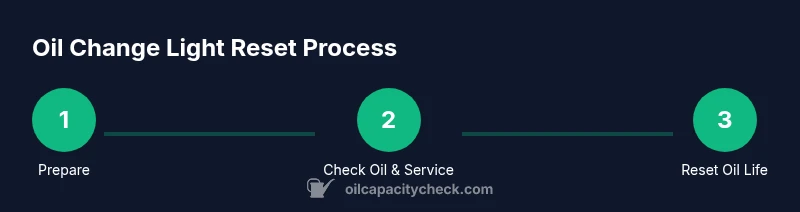
The Step-by-Step block provides the precise actions for your Escape year; refer to the separate STEP-BY-STEP section for model-specific details. In general terms: access the vehicle’s information display, locate the oil life / maintenance option, select Reset or Confirm when prompted, and confirm the reset to 100%. After resetting, drive normally for a short distance to allow the system to recalibrate under real-world conditions. If you’ve recently started the engine, wait a moment before interacting with the reset option to avoid input errors.
Verifying the Light Is Gone and Road Readiness
With the ignition on and the engine off, navigate to the oil life screen to verify that it displays 100% after a reset. If the percentage remains unchanged, repeat the reset once more and check for any error messages on the instrument cluster. Start the engine and take a short drive to see that the oil life monitor updates to a fresh maintenance window. Confirm that you do not see any warning lights or messages related to oil pressure or leaks during the drive. This verification step helps prevent surprises on the next trip.
When the Light Returns: Diagnostics and Next Steps
If the oil change light comes back after a reset or if you notice a drop in oil level, there could be a real maintenance issue: an oil leak, insufficient oil quantity, degraded oil, or a faulty sensor. In such cases, schedule a diagnostic with a qualified technician to check oil pressure, sensor wiring, and the ECU memory. Depending on findings, you might need a second oil change, sensor replacement, or a software update. Keeping a detailed record of service intervals will also help with future maintenance decisions.
Maintenance Habits to Extend Oil Life and Prevent False Alarms
Staying on top of routine maintenance reduces the likelihood of nuisance alerts. Use the manufacturer-recommended oil type and viscosity, replace the oil filter at the right interval, and maintain a clean, dry engine bay. Plan ahead for oil changes by budgeting for quality products and a trusted shop. Avoid short trips that don’t allow the engine to reach optimal operating temperature. Save receipts and notes in a maintenance log to track changes, and review the oil life history before resetting.
Tools & Materials
- Ford Escape Owner's Manual(Model year-specific reset procedure)
- Vehicle keys(Heart of the reset process uses the ignition)
- Clean rag(For wiping dipstick or spills)
- Maintenance log/notebook(To record the oil change and reset)
- Smartphone or internet access(To verify model-year steps on official resources)
- Official Ford service page access(Optional, for year-specific steps)
Steps
Estimated time: 5-15 minutes
- 1
Prepare the vehicle and safety checks
Park on a level surface, apply the parking brake, and ensure the engine is cool before interacting with dashboard controls. This minimizes the risk of accidental burns and input errors.
Tip: Wait 10 minutes after driving before the reset to allow the ECU to settle if the engine was recently hot. - 2
Verify oil level and service history
Check the dipstick to confirm the oil level is within recommended marks and verify the last oil change date and mileage in the maintenance log.
Tip: If the oil level is low, top up to the correct level before proceeding. - 3
Access the oil life monitor on the display
Turn the ignition to ON (engine off) and navigate to the oil life/maintenance screen using the steering-wheel controls or touch screen, depending on model year.
Tip: Refer to the owner’s manual for the exact navigation path for your Escape generation. - 4
Initiate the reset
Select Reset or 100% when prompted and confirm to begin the reset sequence. Follow on-screen prompts precisely.
Tip: Don’t rush; verify you’re selecting the oil life option, not a different maintenance alert. - 5
Confirm the reset to 100%
Ensure the display updates to 100% (or a fully refreshed oil life) before exiting the menu.
Tip: If 100% isn’t shown, exit and retry after a brief engine-off cooldown. - 6
Drive to recalibrate the monitor
Take a short test drive (5–10 miles) under normal conditions to let the system recalibrate with real driving data.
Tip: Avoid heavy towing or extreme driving during the recalibration period. - 7
Document the reset
Record the reset date, mileage, and oil change details in your maintenance log for future reference.
Tip: This helps future maintenance planning and proves service occurred if questioned. - 8
Observe for warning lights
After the recalibration, watch for any new alerts such as oil pressure or leaks; address any new warning promptly.
Tip: If any serious warning arises, stop driving and seek professional service.
People Also Ask
Why did the oil change light come back after reset?
A light returning after reset often means either a real maintenance issue (oil level, filter, or oil type) or that the reset wasn’t completed correctly. It can also signal a sensor or ECU calibration problem. Recheck basics, confirm service records, and retry the official reset procedure.
If the light comes back after you reset, there may be a real issue or the reset wasn’t performed correctly. Check the oil level and service history, then retry the official reset steps.
Is it safe to drive with the oil life light on?
Driving with the oil life light on isn’t inherently dangerous if the engine oil level is normal and there are no warning indicators for oil pressure. However, you should avoid unnecessary strain on the engine and address the maintenance quickly to prevent long-term damage.
If the light is on but oil level looks good and there are no pressure warnings, you can drive carefully, but don’t delay service.
Do I always need to reset after an oil change?
Most Ford Escapes require a reset after an oil change to refresh the oil life monitor. Some years will update automatically, but many models need a manual reset. Always follow the year-specific Ford procedure.
In most models you should reset after an oil change, but check your year’s manual for the exact steps.
What can cause the oil light to illuminate after an oil change?
Causes include an incorrect oil grade or amount, a leak or low oil level, a clogged filter, or a sensor/ECU issue. A false reset can also trigger renewed illumination if the memory hasn’t updated correctly.
Low oil level, wrong oil type, or a sensor fault can cause the light to come back after you’ve changed the oil.
Where can I find the reset option in older Ford Escape models?
Older models may place the oil life reset under the Information or Vehicle Settings menu in the instrument cluster. The exact path varies by year, so consult the owner’s manual or Ford’s official support pages for model-specific steps.
Older Escapes often place the reset in the vehicle’s information display; check the manual for exact navigation.
Should I reset the light if the oil level is low?
No. If the oil level is low, top up to the recommended level and address leaks or consumption before resetting. Resetting with low oil can mask a real problem and risk engine damage.
Don’t reset unless the oil level is correct; top up first and verify there are no leaks.
Watch Video
The Essentials
- Verify oil level before resetting
- Follow manufacturer reset steps for your year
- If light returns, investigate oil pressure or sensor issues
- Maintain a maintenance log for future accuracy
- Regular maintenance reduces false alarms