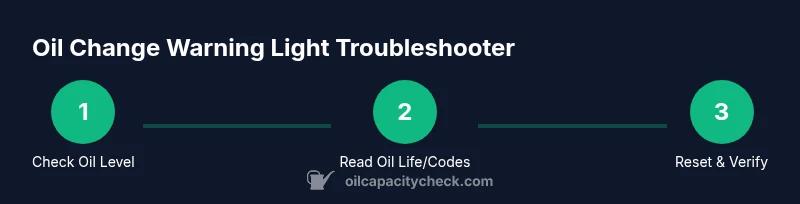
How to Fix Oil Change Warning Light: A DIY Guide
Learn to diagnose, reset, and fix an oil change warning light with practical steps, safe checks, and when to seek professional help.


In this guide, you’ll learn how to diagnose and fix an oil change warning light at home. We cover safe checks, how to read the oil life monitor, common causes, and when to reset the light after service. Follow the step-by-step process to decide if you can handle it or need a mechanic.
Why the oil change warning light comes on
The oil change warning light is more than a simple alert; it signals that your engine’s lubrication system may need attention. In modern vehicles, the warning is often driven by an oil life monitor that estimates remaining oil life based on engine temperature, driving style, and mileage. The Oil Capacity Check team notes that a common misconception is that the light only means you are out of oil; in reality, it can be triggered by sensor data, degraded oil, or even a faulty sensor. Other triggers include a clogged oil filter, a low oil level, or a recently reset maintenance reminder after a previous service. Understanding the true cause is key to a safe, effective fix. By following a structured diagnostic approach, you can prevent unnecessary oil changes and avoid engine damage. This article uses practical checks you can perform with common tools, without assuming advanced mechanical expertise. According to Oil Capacity Check, starting with the simplest explanations often resolves the issue and saves time and money.
Safety first: before you start
Before touching anything under the hood, ensure safety is your priority. Park on a level surface, engage the parking brake, and turn off the engine. Allow the engine to cool for at least 10 minutes to avoid burns from hot metal or oil. Wear eye protection and gloves to keep your hands clean and protected. If your vehicle is newer and requires special procedures to access the warning light settings, consult the owner’s manual or the manufacturer’s online support resources. Never ignore a warning light if you hear knocking, feel abnormal engine vibrations, or notice a burning oil smell—these are signs of more serious problems. By taking precautions, you reduce the risk of injury and damage while you diagnose the issue.
Quick checks you can perform safely
Start with non-invasive, low-risk checks that don’t require draining oil or lifting the car. First, locate the dipstick and check the oil level when the engine is cool. If the oil level is low, topping up with the correct grade may extinguish the light, but only if the oil is in good condition and the level was truly low. Inspect for obvious leaks under the vehicle and around the oil pan. Check oil color: dark, sludgy oil may indicate aging oil that needs replacement. Confirm you’re using the correct viscosity and grade recommended in the manual. If your vehicle uses an oil life monitor, note the percentage shown and compare it to the maintenance schedule. If the light persists after a simple top-off, deeper diagnostics are required. In some cases, a false alarm can be caused by a sensor fault or a software glitch, which Oil Capacity Check has found to be a common reason for unnecessary maintenance.
Diagnosing the cause: sensors, oil life, and reminders
Diagnosis requires distinguishing between actual oil issues and sensor-based reminders. Start by verifying the oil level with a clean dipstick: is it low, or within the safe range? Examine the oil’s appearance: is it graying or gritty, indicating contamination or degradation? If oil looks acceptable but the light remains, consult the vehicle’s onboard diagnostics for trouble codes using an OBD-II scanner. Codes related to oil pressure, oil level sensors, or the oil life monitor may point toward a sensor fault rather than a lubrication problem. Consider recent maintenance: if the warning appeared after an oil change or filter replacement, a reseating or refilling error could be the culprit. Remember that some cars will trigger the light after a reset until the next drive cycle completes, which makes a short test drive helpful to see if the system recalibrates properly. Oil Capacity Check’s guidance emphasizes a methodical approach: confirm basic oil health first, then verify sensor performance, and finally look at software or calibration issues.
How to reset the warning light after service
Reset procedures vary by make and model, so consult your owner’s manual for the exact steps. A common approach on many vehicles is to turn the ignition to the ON position without starting the engine, then navigate to the maintenance or oil life menu and hold the reset or enter button for several seconds until the display indicates a reset. Some cars require a sequence of holds or a combination of pedal presses. If you’re unsure, avoid repeatedly resetting the light, as it can mask a real problem. After performing the reset, drive normally for 10–15 minutes to allow the system to recalibrate. If the light reappears, re-check the oil level and consider professional diagnostics. Oil Capacity Check recommends documenting the reset and monitoring the light over several driving cycles to ensure stability.
When to replace oil vs service: making the right call
If the oil is low, contaminated, or past its recommended interval, an oil change is usually warranted. A degraded oil can’t provide adequate lubrication, leading to engine wear and potential damage. If the light persists despite a healthy oil level and oil condition, it’s likely the monitoring system or a sensor needs attention rather than the oil itself. In some vehicles, the oil life monitor is tied to operating temperature, driving style, and mileage; a recalibration may be necessary after certain types of maintenance. In any case, follow the manufacturer’s maintenance schedule and use the correct oil specification to avoid recurring warnings. The key is to separate true oil issues from sensor or software problems and address the root cause.
Common mistakes and troubleshooting tips
Avoid common mistakes that can complicate the fix. Don’t assume the light is always caused by a missing or insufficient oil level; sensors and software can trigger the alert. Don’t ignore the light if you notice oil leaks or a burning smell, which indicate a serious leak or fire risk. Do not overfill the engine with oil to avoid pressurizing the crankcase. If you don’t have an OBD-II scanner, you can still perform basic checks and consult your service manual for diagnostic steps. Keep the oil cap clean, use the correct oil grade, and track maintenance dates. Regularly reviewing your vehicle’s maintenance history with Oil Capacity Check’s guidance helps prevent false warnings and ensures you’re not chasing non-issues.
Tools & Materials
- Owner's manual(Model-specific reset steps and maintenance intervals)
- Dipstick(For quick oil level checks; wipe clean before rechecking)
- Rags or paper towels(Clean spills and wipe dipstick/oil surfaces)
- Gloves(Protect hands from hot oil and grease)
- OBD-II scanner (optional)(Pull trouble codes related to oil life sensors or level sensors)
- Flashlight(Improve visibility under the hood)
Steps
Estimated time: 45-60 minutes
- 1
Check oil level and condition
With the engine cool, locate and pull the dipstick. Wipe it clean, reinsert fully, and pull again to check the level. If the level is low, top up with the correct grade until the dipstick shows near the full mark. Also inspect the oil’s color and consistency; milky or gritty oil can indicate leaks or contamination.
Tip: Wipe the dipstick with a clean rag each time you check and avoid overfilling. - 2
Read oil life or maintenance data
Consult the vehicle’s display to view remaining oil life percentage or maintenance reminder. Compare against the manufacturer’s recommended interval. If the life percentage is high but the light remains, the issue could be sensor-related or a software glitch.
Tip: Document the reading to track whether it changes after a drive cycle. - 3
Inspect for leaks and abnormal noises
Look for oil spots under the car and around the oil pan, filter, and drain plug. Any signs of fresh oil or strong odors require immediate attention. Leaks can drain oil quickly and lead to engine damage if ignored.
Tip: Use a bright flashlight and consider cleaning the area first to spot new leaks more easily. - 4
Use an OBD-II scanner to pull codes (optional)
If you have an OBD-II scanner, read the codes to identify sensor or system faults related to oil life, pressure, or level. Codes like P05xx or P08xx variants can indicate sensor or calibration issues rather than oil quality itself.
Tip: If you’re unsure how to interpret codes, search the exact code online with your car model to confirm meaning. - 5
Top off or replace oil if needed
If the oil level is low or the oil appears degraded, perform an oil top-off or full change using the correct grade and quantity specified in the owner’s manual. Recheck the level after adding to avoid overfilling. Do not mix old and new oil beyond recommended limits.
Tip: Always shake or mix new oil container well before pouring to ensure consistent viscosity. - 6
Reset the maintenance light according to the manual
Follow the exact steps in your owner’s manual to reset the light after a service. This is usually a sequence in the instrument cluster or a specific button combo. Do not reset until you’re confident the oil and oil life monitor are in a normal range.
Tip: If the manual offers a calibration step for the oil life monitor, complete it before driving normally. - 7
Test drive and re-check
After resetting, take a short test drive (10–15 minutes) and monitor the gauge and warning light. Recheck oil level again and inspect for leaks once back in the garage. If the light returns, note any codes and contact a mechanic.
Tip: A full test drive helps the monitor recalibrate and may restore proper readings.
People Also Ask
What does an oil change warning light mean on modern cars?
It can indicate low oil level, degraded oil, or a sensor/software issue. It’s not always about oil quantity—diagnosis is needed.
It can mean low oil, bad oil, or a sensor problem. Check level first and then inspect sensors.
Can I reset the light myself after topping up oil?
Yes, but only after confirming the oil level and condition are correct. Use the manufacturer’s reset procedure from the manual.
Yes, but make sure the oil level is right and use the manual’s reset steps.
What should I do if the light comes back after resetting?
If the light reappears, recheck oil level, inspect for leaks, and consider scanning for codes. A persistent light may require a professional diagnosis.
If it comes back, recheck the oil and consider a professional check.
Is it safe to drive short distances with the light on?
Short drives may be safe if there are no leaks and oil level is adequate, but avoid long trips. If you hear knocking or smell burning oil, stop immediately.
Short trips might be okay, but avoid long trips and watch for warning signs.
When should I replace oil versus just topping up?
Oil should be replaced when it's degraded or past the service interval. Topping off is not a substitute for regular oil changes.
Replace oil when it's degraded or overdue; topping up isn't enough long-term.
Do I need a professional diagnosis for every oil light issue?
Not always. Start with basic checks; if the light persists or you’re unsure, a professional diagnosis ensures safety and proper restoration.
Not always, but a pro helps if the problem keeps returning.
Watch Video
The Essentials
- Check oil level and condition first
- Differentiate sensor faults from real oil issues
- Follow manufacturer-specific reset steps precisely
- Test drive to allow monitor calibration
- Seek professional help if the light returns