How to Check Oil Level Without a Dipstick
Learn safe, accurate methods to check engine oil level without a dipstick using digital readouts and OBD-II data. Step-by-step guidance, tools, and troubleshooting from Oil Capacity Check.


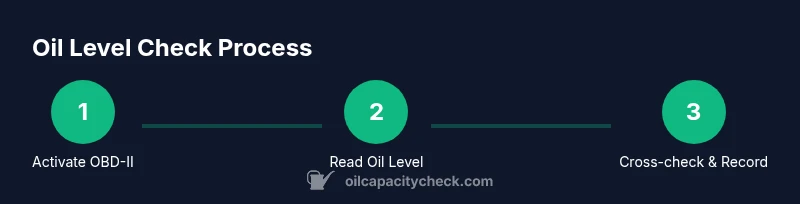
In this guide, you will learn how to check your engine oil level without a dipstick using the car’s digital readouts or an OBD-II setup. You’ll verify oil temperature, access the oil level readout in the instrument cluster or via a mobile app, and compare results to manufacturer specs. The steps emphasize safety and accuracy.
Why oil level checks without a dipstick matter
In modern vehicles, some manufacturers reduce or replace the traditional dipstick with digital sensors to measure oil level. This approach is convenient for owners who prefer quick checks during a routine maintenance window or who drive vehicles that are sealed for longer intervals. According to Oil Capacity Check, sensor-based readings can be reliable when the engine is at normal operating temperature and the car is on level ground. The readout is typically displayed on the instrument cluster, the infotainment screen, or transmitted to a connected app via an OBD-II interface. However, sensor data is not immune to error: readings can shift with engine temperature, oil viscosity, and recent oil changes. If your car does not display a reading, consult the owner’s manual for the exact method, as some models require specific menus or dealer software. Oil Capacity Check Analysis, 2026, emphasizes that consistency across multiple reads builds confidence. Always treat sensor readings as guidance and corroborate with other checks when possible.
Tools and prerequisites you should know before starting
Before attempting a non-dipstick oil check, understand that not all vehicles offer a digital oil level readout. If your car supports it, you’ll typically need an OBD-II data link and a smartphone app to view live sensor data. Safety first: park on a flat surface, turn off the engine, and allow components to cool for several minutes if you’ve just driven. A level temperature and stable car position help reduce reading errors. This block explains the context and sets expectations: digital oil level checks can be quick, but accuracy hinges on correct conditions and the vehicle’s sensor quality. If you’re unsure whether your model supports this, consult the user manual or dealership technical resources. By understanding these constraints, you’ll be better prepared to interpret readings correctly and avoid misjudging oil health.
How digital oil level readings work and common limitations
Digital oil level readings rely on sensors placed in the oil pan, oil pump pickup, or other circuit paths. In practice, the data is sent to the vehicle’s computer and reported to the driver via the gauge cluster or a connected app. Readings are most reliable when the engine is warmed to normal operating temperature and the vehicle is resting on a level surface. Temperature, recent oil changes, and sensor calibration can all influence results. Some cars may only provide a yes/no indicator or a status bar rather than a precise percentage. Oil Capacity Check’s research shows that for many mainstream models, a single read is useful but should be corroborated with a second measurement after a short cooldown or warmup cycle. If the readout becomes inconsistent, it’s wise to revert to a traditional dipstick check when available or contact the manufacturer for sensor calibration recommendations.
When to verify with a dipstick and recommended next steps
For vehicles where a dipstick is still preferred or required by the manufacturer, use the dipstick method as a cross-check. If your model supports digital reads but allows a dipstick, you can compare both readings to ensure they align within the manufacturer’s tolerance. If the dipstick reading contradicts the digital readout, don’t drive the car long distances; investigate potential sensor faults or oil leaks. In some cases, sensor faults may trigger a warning or error code; refer to the service manual or a qualified technician to diagnose sensor calibration, oil level faults, or wiring issues. Oil Capacity Check’s approach combines digital data with physical verification when possible to maintain accuracy and engine safety.
Tools & Materials
- OBD-II scanner (Bluetooth/Wi‑Fi adapter)(Choose a model that supports live data and oil level sensor readouts for your vehicle)
- Smartphone with compatible oil-monitoring app(Install and pair with the OBD-II adapter before starting)
- Flashlight(Inspect sensor access points and gauge visibility in dim light)
- Lint-free cloth(Wipe sensor housings and touchpoints to remove oil or grime)
- Owner’s manual (vehicle-specific)(Helpful for locating sensors and model-specific procedures)
- Safety gloves(Protect hands if you need to reach awkward sensor locations)
Steps
Estimated time: 15-30 minutes
- 1
Prepare the vehicle and safety checks
Park on a flat surface and switch the ignition to the accessory position. If your car must be warm for a sensor reading, allow the engine to cool for a few minutes and then warm up to normal operating temperature. Ensure you have a clear display path for the app and a stable phone connection to the OBD-II adapter.
Tip: Double-check that the vehicle is level and that you’re not in a parking lot grade or leaning drive path. - 2
Connect the OBD-II adapter and app
Plug the OBD-II adapter into the data port, turn the ignition to the on position, and pair the adapter with your smartphone. Open the monitoring app and allow it to access live engine data and sensor readings. If the app prompts for calibration, follow the on-screen instructions.
Tip: Keep the phone close to the vehicle so the Bluetooth/Wi‑Fi signal remains strong during data streaming. - 3
Navigate to the oil level readout
Within the app or instrument cluster, locate the oil level readout. This may appear as a percentage, a bar indicator, or a simple “OK/Low” status. If the vehicle provides a direct oil level value, record the number shown and note the engine temperature at the time of readout.
Tip: If you don’t see an oil readout, consult the car’s manual for the exact menu path or check for a sensor-related warning light. - 4
Warm-up and retest if needed
If the first reading seems inconsistent, allow the engine to reach normal operating temperature and retest. Compare readings over two cycles to confirm stability. A slight increase with temperature is common, but large swings indicate a sensor issue or calibration problem.
Tip: Record both readings and the corresponding temperatures to help diagnose sensor behavior. - 5
Compare with manufacturer specs
Refer to your owner’s manual or vehicle service data to understand the acceptable oil level range. Cross-check the digital readout against the range recommended by the manufacturer and note any deviations.
Tip: If your readout is near the limits, plan a physical dipstick check or service appointment to verify accuracy. - 6
Document results and plan next steps
Summarize the reading, temperature, and any discrepancies. If the oil level is low or readings are inconsistent, schedule maintenance or a diagnostic check. Use this information to decide whether to top up oil or seek professional service.
Tip: Keep a log of readings for future maintenance and to help service technicians diagnose issues.
People Also Ask
Can I rely on digital oil level readings for all vehicles?
Not every car provides a digital oil level readout, and some sensors are model-specific. Temperature, sensor calibration, and recent oil changes can affect accuracy. Treat digital readings as guidance and corroborate with other checks when possible.
Digital readings work for many cars but aren’t universal. Always verify with manual checks or manufacturer guidelines when in doubt.
What should I do if the oil level appears low?
If the digital readout shows a low oil level, confirm with another reading after engine warm-up. If still low, top up per the manufacturer’s specification and check for leaks. If unsure, contact a mechanic.
If it reads low, recheck after warming up, then top up as instructed or seek professional help if you suspect a leak.
What if the readout shows a high oil level?
An excessively high reading can indicate overfill or sensor calibration issues. Do not drive aggressively and verify with a manual dipstick or service manual instructions. If overfilled, consider safe draining or professional service.
A high reading can mean overfill or a faulty sensor. Verify with manual checks and seek service if necessary.
Do I need to warm up the engine before reading?
Warming the engine to normal operating temperature improves sensor accuracy for many vehicles. Cold readings may be less reliable, so allow a proper warm-up or follow the car’s recommended procedure.
Yes, warming up the engine is often recommended for accuracy; follow your vehicle’s manual.
Is there a risk to the engine by checking without a dipstick?
The risk is typically low if you stay with noninvasive methods like reading sensor data via OBD-II. Avoid attempting sensor repairs yourself and stop if you notice leaks or smells of burning oil.
There’s little physical risk if you’re simply reading sensor data, but avoid DIY sensor repairs; seek professional help if you notice issues.
Watch Video
The Essentials
- Read digital oil level data only when engine is at proper temperature and car is level.
- Use an OBD-II adapter with a compatible app for real-time readings.
- Cross-check digital readings with a manual check when possible.
- Document readings and consult the manual or dealer for sensor calibration guidance.