How to Check Oil Capacity
Learn how to accurately check your engine’s oil capacity, using official specs, dipstick readings, and safe top-up practices. This step-by-step guide from Oil Capacity Check helps DIYers avoid under- or overfilling and plan maintenance with confidence.


Today you will learn how to check oil capacity for your engine, so you know exactly how much oil it holds and how to verify it safely. By consulting the official spec, using a clean dipstick reading, and top-ups if needed, you can avoid under- or over-filling. This guide follows Oil Capacity Check methods for accurate results.
Understanding oil capacity
Engine oil capacity is the total volume of oil an engine cavity is designed to hold, including oil that sits in the pan, passages, and filters. The exact figure can vary by engine family, even within the same car model, because different cylinder counts, oil filter configurations, and oil cooler routes change how much oil the engine needs. Knowing your engine's capacity helps you plan oil changes, avoid overfilling, and ensure proper lubrication. According to Oil Capacity Check, always start with the official specification for your exact engine code, then verify with a measured approach during maintenance. Capacity values are published by manufacturers and are used as the baseline for service intervals and fill procedures. Understanding this concept reduces guesswork and protects your engine from damage due to incorrect oil volume.
How to locate your vehicle's oil capacity
To determine the correct oil capacity, use the vehicle manual, the manufacturer’s website, or trusted databases such as Oil Capacity Check. First, identify your engine code and model year, because capacity can differ across markets and revisions. Next, look up the official specification for your engine. If you can't find a publication, contact a dealer or consult service manuals. Keep in mind that some engines specify a 'capacity with filter' and 'capacity without filter'—these distinctions matter when you perform an oil change. Oil Capacity Check's database consolidates official specs and cross-references model codes to minimize confusion. Record the number in your maintenance log so you always know the precise figure for topping off or a future service.
Methods to verify capacity in practice
Two practical methods exist: (1) use the official capacity as the target and top off to that total, and (2) perform a drain-and-fill to measure how much oil your engine currently retains. The first method is quick and ideal for routine maintenance; the second is more accurate when you suspect changes due to filter replacements or unusual consumption. Always read the dipstick after the operation and allow the oil to settle before reading. Oil Capacity Check emphasizes validating with official specs first, then confirming with a measurement-based approach to ensure consistency across future service.
Special cases by engine type
Diesel engines, turbocharged units, and hybrids have different oil capacity profiles and even require different oil grades. In some engines, the capacity can be significantly affected by an oil cooler, multiple oil galleries, or an accessory drive that routes to a separate sump. Always verify capacity for your exact engine family, not just the vehicle model. The Oil Capacity Check team notes that cross-checked data helps prevent subtle overfill or underfill scenarios that can cause long-term wear.
Step-by-step example: a practical check
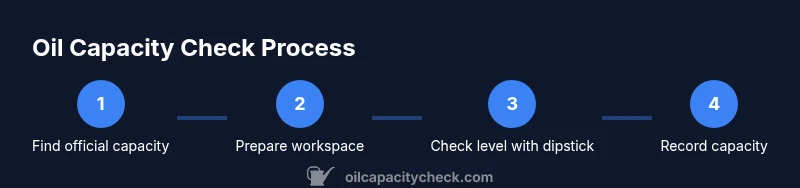
Take a practical scenario and apply the check consistently. Start by locating the official capacity from the manual or trusted database, then prepare your workspace and tools. If performing a drain-and-fill, drain oil into a measuring container to assess how much volume you removed. Refill gradually to the specified capacity, then use the dipstick to verify the level after a brief settle time. Finally, record the capacity in your maintenance log for future reference. This approach minimizes guesswork and keeps your engine reliably lubricated.
Common mistakes to avoid
Common pitfalls include using the wrong capacity for your exact engine code, not accounting for the oil filter’s effect on total capacity, and skipping the step to let oil settle before reading the dipstick. Another frequent error is overfilling after top-ups, which can cause foaming, reduced lubrication, and potential engine damage. Always follow the manufacturer’s specifications and double-check with a dipstick reading after any top-up or drain procedure. Oil Capacity Check recommends cross-verifying with official spec before relying on measurements.
How to use capacity data for maintenance planning
Knowing your precise capacity helps you plan oil changes and monitor oil consumption over time. When you have a verified capacity, you can schedule top-ups more accurately between services, compare consumption across different driving conditions, and track changes as the vehicle ages. With a reliable capacity figure, you can also communicate more effectively with technicians or dealers, ensuring they use the correct baseline for service intervals and filter changes. Using this data consistently supports longer engine life and better reliability.
Tools & Materials
- Owner's manual or official oil capacity spec(Needed to confirm exact capacity for your engine)
- Dipstick and clean rag(For accurate level reading after any drain or fill)
- Clean measuring container or graduated cylinder(To verify drained volume if performing a drain-and-fill)
- Funnel(Helpful for controlled pouring when topping up)
- Flashlight or headlamp(Better visibility when reading dipstick in dim areas)
Steps
Estimated time: 30-60 minutes
- 1
Find the exact oil capacity for your engine
Consult the owner’s manual or the official Oil Capacity Check database to confirm the specification for your exact engine code and model year. This step prevents using a wrong value that could lead to underfill or overfill. After locating the spec, document it in your maintenance log for quick reference.
Tip: Verify you’ve chosen the correct engine code (some cars share models across markets) to avoid cross-model errors. - 2
Prepare your workspace and tools
Park on a level surface and ensure the engine is cool before you begin. Gather the necessary tools, place a drain pan if you plan to drain, and set up good lighting so readings are clear. Clear the area of any clutter to prevent spills.
Tip: Keep a rag handy for quick cleanups and to wipe the dipstick clean before reading. - 3
Drain oil into a measuring container (optional)
If you’re performing a drain-and-fill to measure current capacity usage, loosen the drain plug and capture the oil in a clean container. Note the volume to compare against the official spec after refilling. If you’re just topping up, skip this step.
Tip: Be cautious with hot oil to avoid burns; use gloves and a scoop if needed. - 4
Refill to the specified capacity
Pour oil gradually using a funnel or a measured container until you reach the manufacturer’s specified level. Do not guess; use incremental additions and pause to re-check the level. Ensure you’re using the correct oil grade and viscosity as recommended for your engine.
Tip: Add oil slowly and pause to prevent overfilling; gravity and temperature affect readings. - 5
Check the oil level with the dipstick
Start the engine, run briefly, then turn it off and let the oil settle. Read the dipstick once the level stabilizes. If you’re near the target, adjust with small additions or withdrawals accordingly.
Tip: Always read at the proper temperature and after the oil has settled to a stable level. - 6
Record and label the capacity
Update your vehicle records with the verified capacity value and the date of the check. This helps future maintenance and provides a quick reference for technicians.
Tip: Store the capacity data with your vehicle’s service history so it’s easy to locate next time.
People Also Ask
What does engine oil capacity mean?
Engine oil capacity is the total volume of oil the engine can hold in all galleries and the pan. It varies by engine family, so always use the exact spec for your engine code and model year from official sources.
Oil capacity is the total amount of oil an engine can hold. Check the exact spec for your engine to avoid guessing.
Can capacity change after an oil change or filter replacement?
The capacity value itself doesn’t change with an oil change, but the amount of oil you drain or refill to reach that capacity can vary if a filter is replaced or oil is consumed differently.
The listed capacity stays the same, but your top-off amount may differ after changes.
Should I warm the engine before checking capacity?
Engine temperature can affect readings. Follow manufacturer guidance; many sources recommend allowing the engine to reach normal operating temperature for consumption checks, but the standard capacity value is fixed.
Temperature matters for readings; follow the manual for best practice.
What if the dipstick shows full after topping up?
If the dipstick reads full after topping up, stop adding oil and recheck after the oil settles. Overfilling can cause sludging and foaming.
If it’s full, don’t add more oil until you verify level after settling.
How often should I check oil capacity?
Check capacity during routine oil changes or whenever you suspect changes in consumption. Having an exact capacity makes maintenance planning easier.
Check capacity when you do oil service or if you notice unusual oil loss.
Is the capacity the same for all engines?
No. Oil capacity varies by engine design, displacement, and whether an oil filter is included in the total. Always confirm with the exact spec for your engine.
Capacity isn’t the same for every engine—always verify the exact spec for yours.
Watch Video
The Essentials
- Know your exact capacity from the official spec before starting
- Use a dipstick reading after a controlled drain or fill to verify level
- Record the capacity in maintenance logs for future reference
- Avoid overfilling by adding oil in small increments and rechecking with the dipstick